Running AI Coding Agents Across Several Machines
How I run Claude Code, Codex, Antigravity and Muse Code across a mini PC server and a workstation: one rulebook, a router for delegated work, hard safety gates and real numbers.
 Karl Nyen
On this page
The v3.0 rebuild of this site was mostly written by AI coding agents, and so is a lot of the tooling that runs my home lab now. Not one agent in one terminal: several agents from four vendors, working at the same time, across more than one machine. This post is how that setup works, what keeps it from going wrong, and what twelve days of it look like in numbers.
The machines and the agents
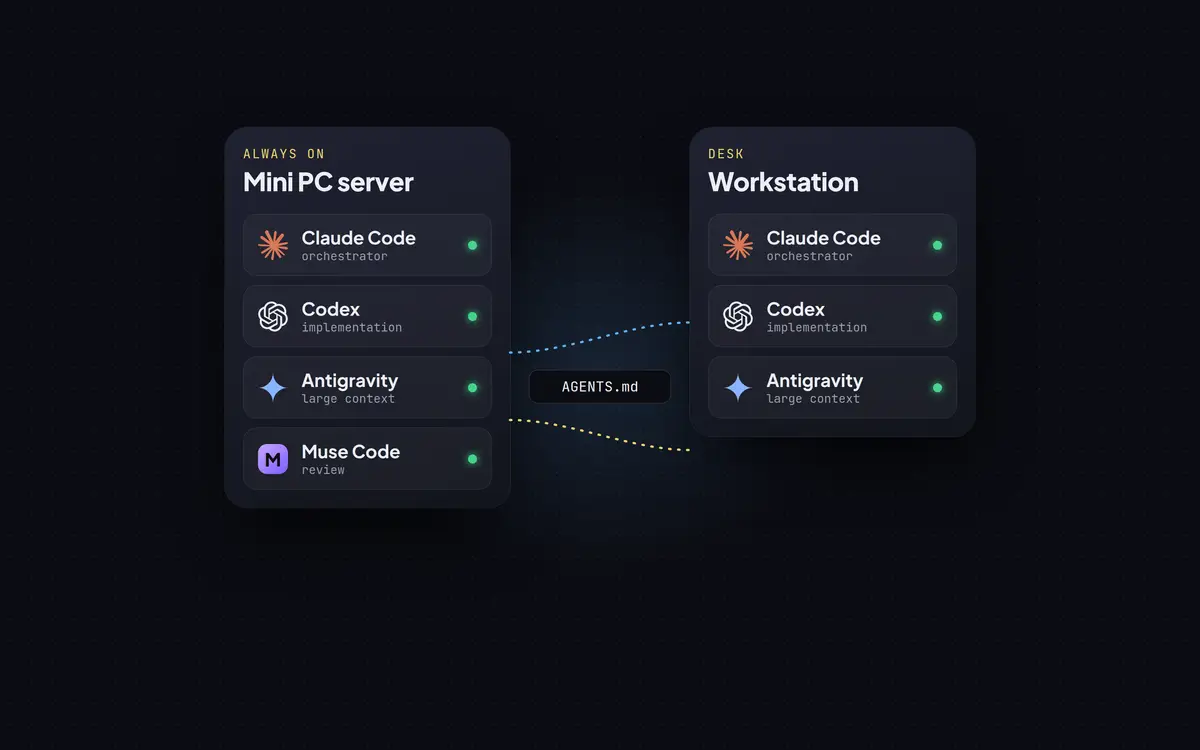
There are two main machines. An always-on Ryzen mini PC is the server: it runs T3 Code, a self-hosted web interface for coding agents, plus the project dev servers and a dashboard. A workstation runs its own agent sessions against the same repositories. A Windows 11 VM on one of the Unraid servers handles the few tools that only exist on Windows, over SSH.
The agents come from four subscription plans:
| Agent | Role |
|---|---|
| Claude Code (Opus) | The orchestrator: talks to me, plans, owns design and architecture, reads every final diff, commits and publishes |
| Codex | Most delegated work: bounded implementation, code review, repository research |
| Antigravity (Gemini) | Large documents and logs, plus simpler verified tasks |
| Muse Code | Additional review capacity |
The reason for four plans isn’t loyalty to any model. Each plan has its own usage limits, and a single plan doing everything hits them by mid-week while the others sit idle. Spreading work across all four keeps everything moving.
One rulebook for every agent
Every agent reads the same rules. A single global rules file lives in a Git repository that also describes the lab’s hosts, services and repositories, and an install script copies it to each machine in the place each agent expects. Each project adds one AGENTS.md for what is specific to that repo. There are no agent-specific instruction files in a project: Claude Code reads AGENTS.md itself, and so do the others.
Two rules make that work in practice:
- Keep it short. Every agent loads the rules into every session, and one of them truncates rule files at 24 KB. So the target is about 12 KB per file, and detail moves into docs with a pointer saying when to read them.
- Rules are agent-agnostic. A skill or a hook is written once and wired into each agent. Any agent can pick up any repo at any time.
Delegation is routed, not guessed
The orchestrator doesn’t pick a model for each task by feel. Work is grouped into named routes (code.impl, review.code, read.repo, research.deep and so on), and each route has an ordered list of candidate models. A small script picks a candidate by checking how much of each plan’s usage window is left right now, so equally suited work goes to the plan with the most room:
$ delegate-route.py pick review.code
[route review.code -> codex/gpt-6.1-sol high | primary | codex w5%; claude s19% w13% | rules 343f8ac]That one line says: send this review to Codex on GPT-6.1 Sol at high effort, because Codex has used 5% of its weekly window and Claude is further along. The route tag goes at the top of the brief, and a hook refuses to start any delegated task that lacks one, so nothing bypasses the routing.
Some routes aren’t enabled for delegation yet. Implementation work stays with the orchestrator until enough reviewed delegations show it can be trusted; that decision is on a calendar, not a whim. For risky changes (authentication, data and deployments) the review.council route sends the same diff to every provider at once and compares what they find.
Every delegated task gets a brief with the exact checkout, the files it may touch, the design it must not change, how to prove it worked and when to stop. When it comes back, the orchestrator checks the diff and the evidence and records a verdict: accepted or reworked.
Safety: what no agent can do
The agents are allowed to work almost autonomously. A clear instruction like “push it” or “delete the repo” covers every step it implies, with no second confirmation. That only works because a few things are impossible regardless of what anyone says:
- A governance gate runs before every tool call in all four agents. It denies only catastrophic or secret-leaking actions: disk and partitioning tools,
ddonto devices, recursive deletes or permission changes on/or on protected folders like~/.ssh, printing credential files and environment variables, and tokens embedded in URLs. When it denies something, the agent gets the reason and has to find another way. - Nothing runs as root. Agents can’t type a
sudopassword, so privileged steps come back to me as an exact command to run. - Unasked outward actions wait. Agents don’t push, deploy or delete on their own initiative. Repos that deploy on push are gated on me.
- Confidential repos stay on the LAN, enforced by a push guard as a hook and as a Git
pre-pushhook.
Sharing one small server
Several agents on one mini PC will happily start several builds at once. Two rules keep the machine usable:
-
One heavy job at a time, and anything long or memory-hungry runs through a tiny wrapper that caps it:
cap_kb=$(( avail_kb * 8 / 10 )) # 80% of what is free right now, at most 24 GiB exec systemd-run --user --scope --quiet \ -p MemoryMax="${cap_kb}K" -p MemorySwapMax=0 \ nice -n 10 ionice -c2 -n7 "$@"A runaway test suite dies alone instead of pushing the whole server into swap.
-
Dev servers go through one gateway. No agent opens its own port on the LAN; each preview is registered with the dashboard and served under one HTTPS origin.
Publishing
Most repos are main-only: agents commit finished steps to main and push through a bare Git hub on the server, which mirrors to GitHub. Repos that need review publish through a script that opens one pull request per task, waits for an automated Codex review, and holds the merge if that review finds anything serious. Commits go out under my own identity, with no AI attribution lines.
Twelve days in numbers
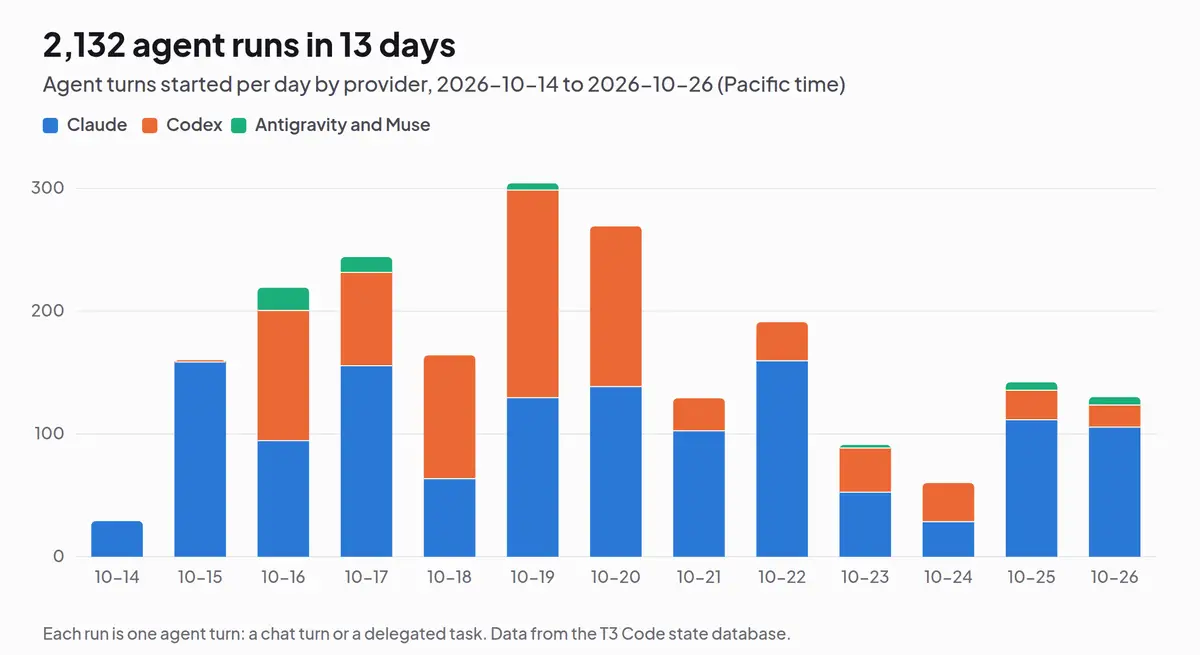
T3 Code records every agent turn in a local database, so these numbers come straight from it, covering 2026-10-14 to 2026-10-26:
| Measure | Count |
|---|---|
| Agent runs (chat turns and delegated tasks) | 2,132 |
| Runs that completed | 2,029 (95%) |
| Delegated tasks | 565 |
| Delegated to Codex / Claude / Antigravity / Muse | 374 / 152 / 34 / 5 |
| Review councils | 14 |
| Agent busy time | about 132 hours |
| Commits recorded | 679 |
| Verdicts recorded: accepted / reworked | 18 / 7 |
| Provider | Runs | Busy hours |
|---|---|---|
| Claude | 1,335 | 77.0 |
| Codex | 748 | 51.0 |
| Antigravity | 44 | 3.7 |
| Muse | 5 | 0.2 |
Two things stand out. First, 132 hours of agent work in twelve days is more than one full-time person, from someone who also has a day job. Second, 7 of 25 recorded verdicts were “reworked”: more than a quarter of delegated work needed fixing before it was accepted. That’s why the orchestrator reads every final diff, and why implementation stays off the delegation routes for now.
Things that went wrong
Every non-obvious failure gets a dated one-line entry in a lessons file, which every agent checks when an error doesn’t explain itself. A few favourites:
- A CI job asked for Node.js 22 and got the runner’s cached 22.23.3. Astro 7.4.2 needs 22.23.4 or later, the release that fixed this month’s Brotli RCE, so every check failed with “Node.js v22.x is not supported” until the version was pinned exactly.
- After a GitHub repository transfer, the automated Codex review never updated its summary comment on pull requests opened before the move, so the publish script waited out its timeout and would have merged them as unreviewed.
- Running one tool’s setup command inside a project rewrote the global agent hooks shared across every project on the machine.
None of these are AI problems. They’re the same integration problems any automation has, found faster because the agents hit them hundreds of times a day.
Would I recommend it?
Yes, with two conditions. Write the rules down where every agent reads them, and make the dangerous things impossible rather than discouraged. After that, treat agents like a capable team that’s new to your environment: give them clear briefs, check their work, and keep a record of what went wrong.
Writing about virtualization, home lab, cloud, storage and gaming on vSkilled, started in 2014.