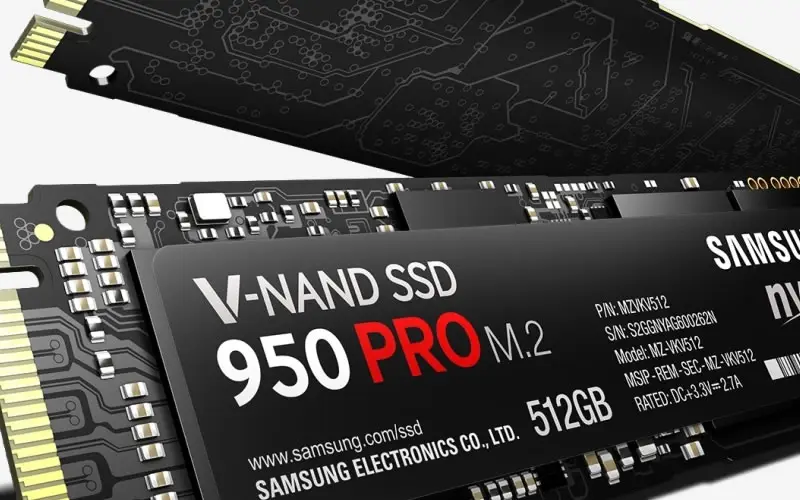
Whoops! My Samsung 950 PRO M.2 512GB SSD experience
This story is a bit of a sad story. Mainly due to the failure of my own personal oversight over a very important specification requirement and snowballed by my…
 Karl Nyen
This story is a bit of a sad story. Mainly due to the failure of my own personal oversight over a very important specification requirement and snowballed by my online shopping addiction.
For a little back story - I had been reading great reviews all over the internet about Samsung’s new 950 PRO 512GB M.2 NVMe SSD drive having amazing benchmark speeds. This drive features cutting-edge V-NAND-based NVMe SSD supports PCI Express Gen 3 x4 lanes, providing a higher bandwidth and lower latency to process a massive amount more data than SATA SSDs. It outperforms SATA SSDs by over 4.5 times in sequential read and by over 2.5 times in sequential write, delivering the speeds of 2,500 MB/s read and 1,500 MB/s write respectively. I have never purchased or used a M.2 drive before, so this would be me venturing into a bit of an unknown territory.
I wanted to get my hands on one of these really badly! I knew my motherboard (Gigabyte X99 G1) had a M.2 slot so I checked the website to confirm and at a glance everything appeared to be right… So I pulled the trigger and purchased it. Patiently waited 2 weeks for it to arrive. Finally, I was able to install the drive after some frustration with BIOS settings and drivers. But something wasn’t right… I was concerned as to why I was getting a little under half of the speed other people were getting on their benchmarks. What gives?
Well… lets take a closer look at my mother board specifications again. It is the Gigabyte X99 G1:
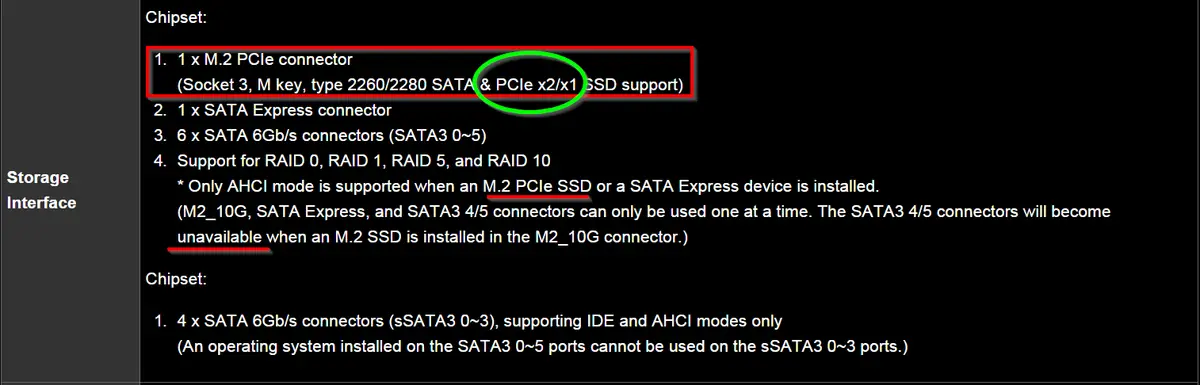
See that..!? Notice the “PCIe x2/x1”? The Samsung 950 PRO 512GB is a PCIe 3.0 x4. So that means that on my motherboard the M.2 drive is operating at literally under half the bandwidth that it’s capable of running at. Only at this point, having the drive purchased and installed, did I realize that there is a major difference between “M.2” and “Ultra M.2” which also known as PCIe 3.0 x4 which supports up to 32 Gb/s (4 GB/s) compared to PCIe 2.0 x2 which would only support 8 Gb/s (1 GB/s).

That means for a M.2 drive using PCI-E 2.0 x2, it only has a 25% potential speed increase over SATA III. Not exactly what I was going for considering the $329 USD price I paid. This means for me to be able to use the drive at full speed I will need to find a motherboard with a LGA2011-v3 CPU socket and a Ultra M.2 socket. A harsh lesson to learn and a fix I will have to put off for some time. Luckily I may be able to just get a M.2 x4 to PCIe adapter to fix this problem.
In the end I can only laugh at myself as a technical professional to make a mistake like this - but hey this is my story and hopefully it may help you avoid making the same mistake. Check to ensure your motherboard’s M.2 interface version supports PCIe 3.0 x4 NVMe 1.1!
Update 1/28/2016:
Fixed! Thanks to the $30(CAD) Addonics ADM2PX4 M2 PCIe SSD to PCIe 3.0 4 Lane Adapter.
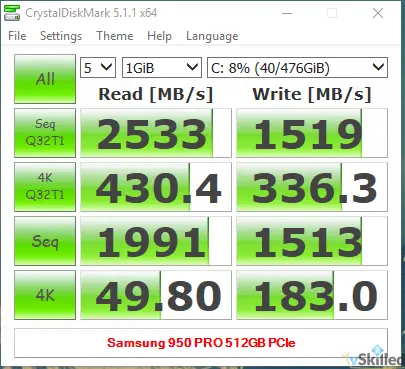
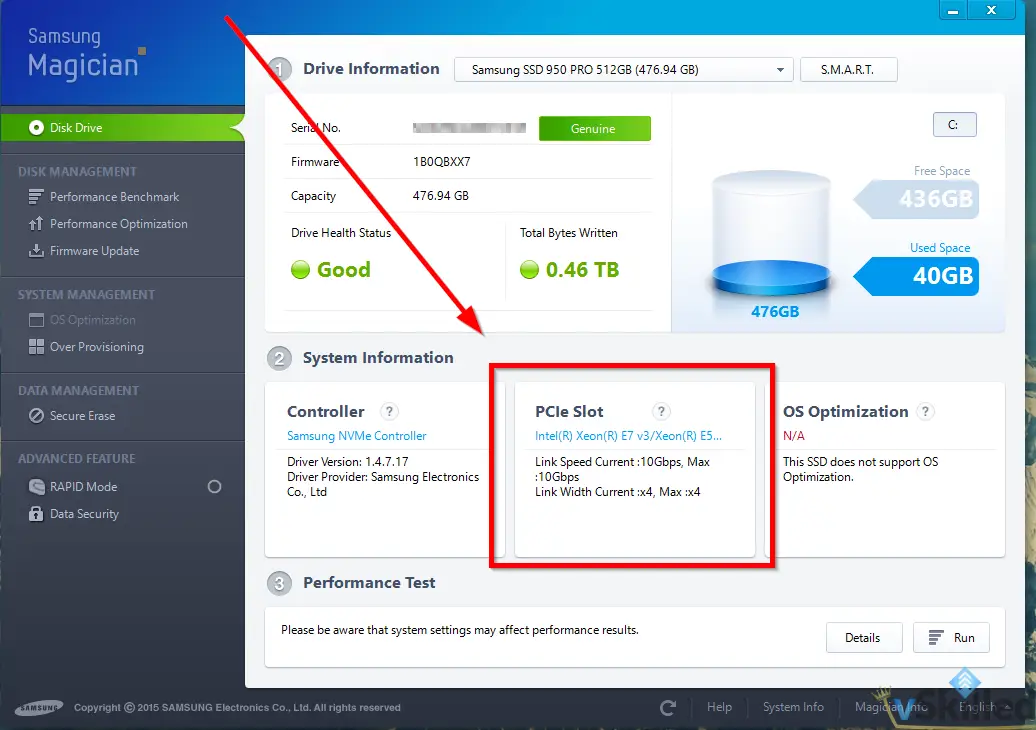
The Samsung Magician software is also showing that I am using all four lanes, instead of just two!
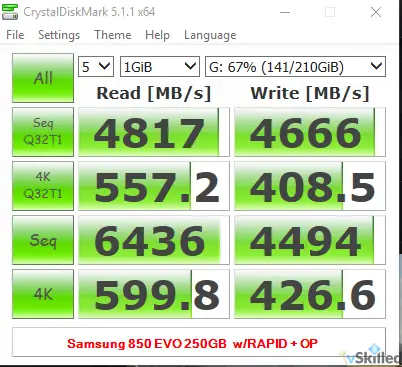
Here’s a bonus benchmark of another Samsung drive I have with RAPID mode (RAM cache) enabled. :O
Do you have a story to tell about your M.2 drive experences? Let me know in the comments below!
Writing about virtualization, home lab, cloud, storage and gaming on vSkilled, started in 2014.
Cover photo: Samsung Memory on Unsplash